

For businesses with small teams and even smaller budgets, the cloud is a lifesaver. Whether it’s being used for data storage or remote collaboration, this useful technology provides access to cost-effective solutions that SMBs couldn’t otherwise afford. But there is a dark side to cloud computing: if left vulnerable, it can quickly turn into an attack vector.
Strong security is essential to protect your cloud environment from threat actors, ensuring high productivity with minimal risk. Just like any strategy, it begins with a comprehensive audit.
Why Cloud Security Matters
Each year brings new, increasingly advanced cyber threats designed to steal data, compromise critical systems, or wreak various other forms of havoc. And with most businesses fully integrating cloud technology into their daily operations, threat actors have spotted a golden opportunity. These solutions are often unsecured and connected to every area of the network. Because of that, attackers can quickly access your entire business with very little effort.
A single breach could have terrible consequences, ranging from extended downtime to heavy fines. Robust cloud security measures help mitigate this risk and allow you to operate in relative safety.
Doesn’t the Provider Handle Security?
A common misconception is that businesses do not need to worry about cloud security, because their provider will take care of it for them. Unfortunately, this is an incorrect and sometimes dangerous belief. While any good cloud service provider (CSP) will implement strong defences on their end, their responsibility ends at the infrastructure level. It is your job to secure your data, manage access controls, and configure services appropriately.
This is often referred to as a “Shared responsibility model”. Taking the time to learn about this model, and understand your role within it, will help you properly protect your business against modern threats.
What is a Cloud Security Audit?
A cloud audit is a systematic review of all current cloud-based solutions, to identify potential issues that should be addressed. Security audits, as the name suggests, are specifically focused on identifying vulnerabilities that might endanger cloud data or systems. This process helps you reduce the risk associated with cyber attacks, data breaches, and regulatory penalties by addressing problems before they can harm your business.
Areas covered during cloud computing auditing typically include:
- Configurations
- Identity and access controls
- Encryption practices
- Data backup and recovery plans
- Perimeter security
- Compliance
The Benefits of Regular Cloud Audits
Regular audits of cloud security provide your business with several important advantages:
- Better Risk Management: Identify and mitigate vulnerabilities early, preventing threat actors from exploiting them.
- More Effective Compliance Tracking: Ensure that all legal obligations are met, address gaps, and document compliance activities.
- Improved Trust: Demonstrate your commitment to security, improving relations with both clients and partners in the process.
- More Efficient Budgeting: Pinpoint defensive measures that are not actually contributing to stronger overall security, reducing budgetary waste.
These benefits make your business significantly safer, while also allowing you to detect inefficiencies and resource waste within your current security posture.
How Often Should You Audit Cloud Security?
The exact frequency of security audits will depend on various factors, including the complexity of your cloud environment, the current threat landscape, and the regulations your business is subject to. But a good rule of thumb is that you should perform an audit:
- Annually: At bare minimum, a comprehensive cloud security audit should be performed once per year. EOFY presents a good opportunity, as you can also use this time to adjust your security budget.
- After Changes: Any time your cloud infrastructure or cyber security changes, you should conduct an audit. It’s also important to stay on top of emerging threats, and check that your defences hold up against them.
- After an Incident: An extra audit should be performed after every security incident, during your post-mortem review. This uncovers the gaps that led to the attack in the first place, allowing you to effectively address them.
If in doubt, it is always better to perform audits frequently. While they require time and resources to get right, the potential cost of a data breach will be far more damaging.
A Comprehensive Cloud Security Audit Checklist
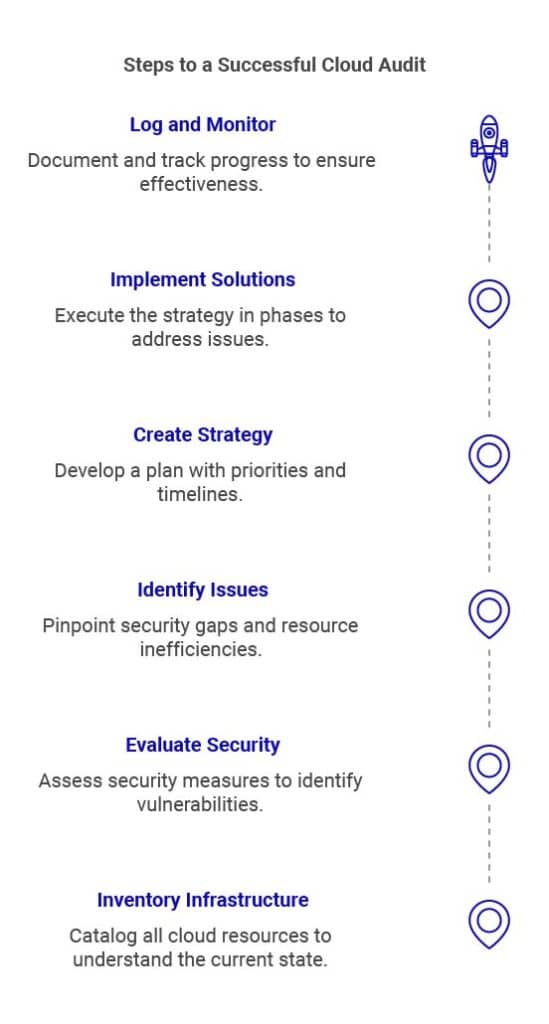
Audits can be difficult without the right strategy, potentially reducing effectiveness. This cloud security audit checklist will help guide you through the process and keep things on track:
1. Identify Infrastructure
Your first step will be to inventory your existing cloud environment. Consider:
- Storage
- Applications
- Virtual machines
- Networks
If your business uses multiple cloud services at once, think about how they interact with each other. A clear inventory is essential, to ensure that your security covers each part of your cloud infrastructure without leaving any gaps.
2. Evaluate Current Security Posture
Thoroughly evaluate your existing security measures and their effectiveness. You will need to consider many factors, including:
Identity and Access Management (IAM)
- Are roles and permissions clearly defined? Are any employees able to access sensitive information that they don’t actually need?
- Are multi-factor authentication (MFA) mechanisms in place and consistently enforced?
- Are inactive, orphaned, and other unnecessary accounts being deactivated promptly?
- Are staff logging out every time they step away from devices?
Data Protection
- Is data encrypted to the highest available standard, both at rest and in transit?
- Is everyone involved using secure encryption key management practices?
- Is sensitive data appropriately classified and stored?
- Are employees taught how to correctly handle sensitive data?
Network Security
- Are firewalls and virtual private networks (VPNs) in place and properly configurated?
- Is your business prepared for network-specific threats, such as Distributed Denial-of-Service (DDoS) attacks?
- Are network access controls in place?
- Is there clear guidance for how remote employees should access internal and external networks?
Compliance and Governance
- Is your cloud infrastructure compliant with all important regulations (taking into account that many international laws may also apply)?
- Is there clear, consistent, and up-to-date documentation of your compliance activities?
- Are employees trained on the importance of compliance, and told how this relates to their activities using the cloud?
Incident Response
- Do you have a documented, thought-out incident response plan that addresses attacks on the cloud?
- Are all critical roles and responsibilities clearly outlined? Has each person been directly informed of their role?
- Are regular drills and tabletop exercises conducted, to identify gaps and reinforce the plan?
Backup and Disaster Recovery
- Is data being backed up regularly, to a location that would remain secure if the cloud was compromised?
- Are backups being tested, to ensure that they actually worked?
- Is there a clear recovery time objective (RTO) and recovery point objective (RPO) to help manage data loss?
- Are cloud backups sufficiently protected?
Remember to compare your current security to global standards, such as the NIST Cybersecurity Framework. These can provide valuable insights into where your weakest links are, and what you can do to more effectively address them.
3. Look for Vulnerabilities and Resource Waste
With the information you have gathered, examine your cloud infrastructure. Look for two things:
- Gaps in your current security posture that may endanger your cloud environments
- Redundancies (e.g. two different solutions that perform the same function), and other defensive measures that waste resources without actually contributing to stronger security.
These are the issues you must target to streamline and strengthen your cloud defences.
4. Create a Game Plan
Develop a strategy outlining how you will address the problems your evaluation uncovered. Prioritise major security gaps first, as these can cause the most damage. Then move to minor security issues, and then look at improving resource efficiency. Include timelines, responsibilities, and performance metrics in your plan.
5. Implement Solutions
Carry out your plan in phases, as your available resources allow. You might need to implement critical security solutions immediately, and then wait before smaller ones can be introduced. A slow and steady approach will serve you well in the long run, by preventing resource strain and allowing you to spot potential problems early.
6. Log and Monitor
Consistent records are essential, both to ensure the continued security of your cloud environments and to demonstrate compliance with data protection laws. Document everything, and keep multiple copies across different locations. Detailed records of each audit and its results should also be kept. This will help you track progress over time, and identify any vulnerabilities that are consistently not being addressed.
Once your new security strategy has been implemented, remember to continuously monitor it. Compare your progress against your original goals, and adjust course as needed.
Advanced Cloud Security Auditing Tips
While the checklist above is essential, it only provides you with a baseline. Those strategies will improve your cloud security at a basic level, while also setting the groundwork for stronger compliance practices. For additional protection, implement these advanced cloud security auditing practices:
Use Audit Tools
Manual auditing is prone to human error, and may be forgotten entirely. There are a variety of tools available that can help simplify the process, by monitoring for potential attacks and automatically documenting their findings. This reduces the time spent trying to gather information on your own, vastly speeding up your audit while improving accuracy.
Conduct Third-Party Risk Assessments
Don’t forget that your business is only half of the equation. Your cloud service providers are just as responsible as you for ensuring security, and can easily become an attack vector themselves. Verify the defensive measures used by each provider. If you can’t, or these controls are deemed insufficient, consider switching to a provider that prioritises security. Check regularly to ensure third-party security is keeping up with modern threats and regulatory developments.
Ask an Expert for Guidance
Performing a cloud security audit on your own may not be realistic, for a variety of reasons. You might not have the resources, time, or internal expertise to do a thorough job. In this scenario, it might be better to outsource this task to a third-party. They can conduct the audit for you, advising of any issues they uncovered during the process and providing guidance on how to effectively address them.
FAQs
Q1: What is the difference between a cloud audit and a traditional IT audit?
Unlike a traditional IT audit, a cloud security audit primarily focuses on your cloud environment. While other sections of your IT infrastructure may be inspected, this is for the purpose of determining whether they present a threat to your cloud environments. A regular IT audit, on the other hand, is designed to provide an overview of all systems.
Q2: What is a cloud security audit certification?
Various cloud security audit certifications are available online that claim to provide your staff with the tools they need to perform this task. The quality of these courses may vary, so if you choose to consider this path be careful to thoroughly vet them out.
Q3: Can small businesses afford cloud security assessments?
Cloud security audits are well within reach for many small businesses. If you are concerned about your ability to support this task, think about reaching out to a managed service provider (MSP). They can help improve your cloud security at a much lower price point than in-house staff require.
Q4: Are cloud audits necessary if we already have a security team?
Audits are an essential part of your cyber security strategy. They provide necessary guidance on where improvement efforts should be focused, preventing disorganisation and ensuring accuracy. They will also help you identify issues that are not being addressed, allowing security staff to change course. For these reasons, you should perform cloud security audits regularly, even if you have an internal or external IT team.
Ensure Cloud Efficiency and Security With Expert Support
The cloud is a powerful tool, but it also introduces a wide range of potential threats. Without a clear understanding of your security posture and risk factors, you cannot hope to prevent attacks effectively. Instead, you’ll be flying blind, leaving your business – and cloud data – vulnerable. Regular, comprehensive cloud security audits are the only way to truly solve this problem. The knowledge they provide is invaluable for ensuring safety and efficiency when using the cloud.
Still confused? The cloud experts at National IT can teach you everything you need to know, from migration to cost management strategies. Get started with our ultimate guide to cloud computing.